Showing posts with label Illustrator. Show all posts

Wednesday, December 30, 2009

Form over Function


I think it should be safe to share this now. Probably not any crossover traffic between my client's site and this blog. :)

I did some work a while back for a marketing company in Los Angeles. They came back to me recently with a request for me to modify some of the art I did for them into the above. I don't know what you actually call these planes but they are the ones that are printed on a foam material and you punch out the shapes and slide the wing through the fuselage. When you throw it, it flies! Sadly this one is designed to just look nice as part of their mailer. It was never designed to actually fly. Hence the title of today's post. :)

The artwork was done in Adobe Illustrator CS3.

This is Post #802

Thursday, September 17, 2009

Commercial Work & News Bits

The other day I realized it has been quite a while since I posted some of the commercial work that I do. It's been a lot of pin-ups and comic work. Well, I'm in a situation where I can't show anything like that today. I do have a few commissions in progress: The Hulk on Canson Paper, A series of Harley sketches for a series of paintings, Dr. Doom inked piece, a Golden Age Sandman inked piece and two others that are gifts and can't be shared until after they are presented, but I can't show any of those.

Also, I spent the better part of the day inking CAVEWOMAN over Budd Root's pencils. Yup, that's right, I am inking some CAVEWOMAN goodness. :) Pretty cool, huh? And I can't show that either.

So what can I show you? How about some commercial work?

I have been doing a wide variety of work for this client for years. He owns and/or operates several business and I have been doing his graphics and artwork for years. I might be doing all of it for all I know. One business he manages is a resort and club that is expanding. I was hired to produce this map based on the site plans that were drawn up. This will be used in the sales office and for ads. Copy will be added to it for each usage. The map was done in Adobe Illustrator and then taken into Adobe Photoshop for background color and photo placement and effects.

This is a good example of why I love what I do for a living: Always something different, always new challenges, always learning new skills or applying old skills in a new way.

Back with some sexy stuff tomorrow. Maybe. :)

This is post #696

Wednesday, June 3, 2009

Invincible & Gidget

If the image below looks slightly familiar, it's because it is. Andrew had already scooped up the Atom Eve piece I did for fun when I did the rough Invincible sketch. He asked for it but I told him it was just a little 5 inch blue pencil sketch in my sketchbook. I offered to size it up, ink it and make it a companion piece for Atom Eve. That worked for him and now Eve is not alone. Thanks again Andrew, both pieces will be at my table at HeroesCon waiting to go home with you. :)
And now for something different. My wife Deena had always wanted an English Bulldog. And almost two years ago we got one. She is named Gidget, and she is one of the silliest dogs I have ever lived with. She's pushy, she's lovable, she's a big baby, and she loves her mommy. Deena will call me on my cell to let me know she is on her way home from work. Gidget knows the time of day and recognizes the ringtone for Deena's calls. When the phone rings, no matter where she is in the house, Gidget hears it and jumps up in her chair at the living room window watching for her mommy. As I type this, Gidget has decided to sleep under my desk. Given her size, she takes up most of the space. And her snoring is so loud, it's a wonder I can hear myself think. Yesterday, I did this little cartoon of Gidget in Adobe Illustrator, starting from a little pencil sketch.

Sunday, January 25, 2009

Spring

Yes, I know it is still the dead of Winter (in some parts) and Spring is still 50 or so days away, but I was inspired.

This fairy started out as a pencil sketch in my sketchbook yesterday. I scanned the pencils in so I could enlarge it, print it, and light table it on to another board for inking and/or painting. But once the sketch was digitized, I decided to do the entire piece in Adobe Illustrator CS3. I really had no idea where I was going except for drawing and coloring the fairy. Once she was done I tried to come up with a background color and from that grew the whole "Spring" theme.

The entire piece was done in about 1.5 hours. About 30 minutes devoted to figuring out what to do with the background. You never know when the muse will strike or where she will take you. I'm just glad she drops by here every so often. :)

Thursday, July 31, 2008

Business Solutions Maps

Today was a day of writing quotes for two jobs, confirming a new job, conference calls and writing emails. By the time 5:30 came around, I realized I had nothing done. Not too productive but sometimes the business end of freelancing demands some attention. I just got the approval a few days back to show the art I am posting today. I held off posting it as not to interrupt the pin-ups, but with no pin-ups today...

I was contracted by Solutions House of Tarpon Springs, Florida to create this map. Solutions House had become aware of my work at The Collaborative Labs and brought me in on this project. This artwork was created in Adobe Illustrator and Photoshop CS3. It was created at the actual print size of 36" x 60" at 300 dpi. In CMYK. This was a big file. Most elements were created separately in one file and then pasted into the master. It made it a bit more manageable. Still I have over 60 layers in Illustrator when everything was done. The final maps were printed on a very thick vinyl.

The map represents the fictional county of Serene, Florida. When used with the supporting materials, (a guide book, chips, dice, instruction cards, etc.) and a facilitator, a group of 4-6 people play out civic planning scenarios. This was used for a series of "town hall" meetings in Sarasota County. The community was invited to go through the process of planning the future of a fictional county. At each of the events we would have 4-6 people at one of the 10-20 tables playing out the game. Other related activities followed. It really gave people the idea of what it's like to try to meet the needs and desires of the community. Not so easy. And it gave them a chance to prioritize what is really important to them in their community. It was a very successful endeavor.

Solutions House has been a pleasure to work with. And I'm working with them again. This time for a private corporation in Pittsburgh. I don't know if I will ever be able to show the work. I can tell you it is same physical size as this piece but much, much, much more complex. :)

Tuesday, July 8, 2008

Hot Fudge Sundae - Process

This is the last piece of art for my July package from CILM. Today I decided to work a little differently. I like to mix it up in order to challenge myself from time to time.
I did my initial sketch in my sketchbook in blue pencil. I opted not to ink it. Instead, I scanned it and then brought it into Adobe Illustrator. Illustrator is a vector program. In the simplest terms,  you have to make the shapes and fill them in order to create the art. Photoshop on the other hand is a pixel based art program. You "paint" the pixels. There is an advantage to doing vector versus pixel that I will explain in a moment. So, the image on the left is my sketch on a layer under my work layer. I had to outline each sketch line and fill with a color. I am making my bold and thin lines this way. In Photoshop I would just paint the lines, much like using a brush and ink in the real world. 
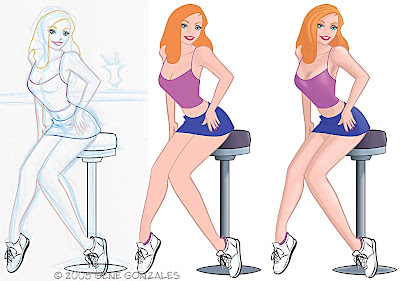
The middle image above has the outlines complete. I filled everything (legs, clothes, etc.) with a base color and then copied and pasted the image into Photoshop. From there I started establishing highlights and shadows. When that was done, I started over and repeated the process with the background. When it was completed I brought that into PS and put it on a layer behind the girl. Touched it up, adjusted the saturation, cropped and saved. Below is the final art.
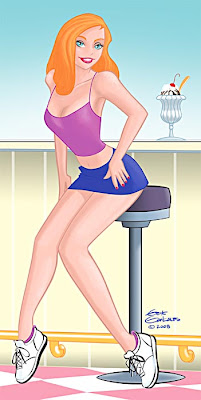
I could have done everything in Illustrator if I chose to. It would have looked slightly different because of color shifts between the two programs, but still would have been fine. The advantage to doing the art in a vector program is that you can enlarge the art as big as you want. A two inch by 2 inch piece could be enlarged to 20 feet by 20 feet or more, if you want. I believe the way they explain it is a vector program fills the area mathematically. While in PS, if you paint 10 pixels and you enlarge them, the program doesn't enlarge the pixels, it can't, it just adds them, guessing what the colors should be. Thats why if you enlarge a PS image or photo, it gets blurry. There are ways around it but this will suffice for the point I am making about the two programs. I hope it makes sense. There are others that can explain it better the me. Hope I didn't bore anyone. :)

Friday, May 30, 2008

On The Road Again


Todays theme fits todays activities. I am going out of town for a couple of Lab gigs. I will be back tomorrow. So with traveling on my mind, I thought I would share a couple of pieces I did just recently. I do a lot of work for a Life Coach. He needs a wide variety of artwork for his business and the two pieces above are a good example. I did both of these based on an RV and trailer he is purchasing. None of the decals are done yet, but this artwork will be the starting point for it. The road sign is part of a promotion he will be doing. There are several signs with different US cities on them. This is all vector based artwork done in Adobe Illustrator.
Gotta load up the car and get going. Happy Friday everyone!